AI presentation tools have gotten pretty good at looking like PowerPoint. Manus just skipped the lookalike step entirely. The platform's new PowerPoint mode generates true native .pptx files from the very first slide — not converted from a web format, not exported from a visual preview, but authored as a real PowerPoint file from the start.
That might sound like a small technical distinction, but it changes everything about how useful the output actually is.
Why "Native" Matters
Until now, Manus generated presentations in a web-based format and converted them to .pptx on export. The result often looked fine on screen, but the conversion step introduced familiar problems: charts becoming flat images, table formatting breaking, slide layouts shifting. Anyone who's ever "exported to PowerPoint" from a browser tool knows the frustration.
PowerPoint mode skips that layer entirely. Every element in the output deck is structurally real — charts are backed by live data tables you can click into and edit, tables have proper cells that support merging and resizing, and layouts follow standard slide masters. Download the file and open it in Microsoft PowerPoint or Google Slides and it behaves exactly like a deck built there natively.
What You Can Turn Into a PowerPoint Deck
PowerPoint mode accepts the same range of inputs Manus has always supported. The difference is what comes out.
- Spreadsheet data: Connect Google Sheets through the Workspace connector, point Manus at your data, and request a presentation. Manus analyzes the numbers, identifies trends, builds editable charts, and outputs a
.pptxwhere every visualization retains its underlying data. Update a cell in PowerPoint and the chart adjusts automatically. - Research topic: Describe a subject and Manus conducts research across multiple sources, synthesizes the findings, and generates a slide deck with properly cited content and data-backed visuals — all in native PowerPoint format.
- PDF or document: Upload a report, whitepaper, or brief. Manus extracts the key points, structures them into a narrative, and builds a presentation you can hand directly to your audience.
- URL: Point Manus at a webpage — a competitor's site, a product page, an article — and get a structured analysis or summary packaged as a
.pptx. - Meeting notes: Paste raw notes or a call transcript and Manus turns them into a polished recap deck ready for distribution.
In-App Chart Editing — Before You Even Download
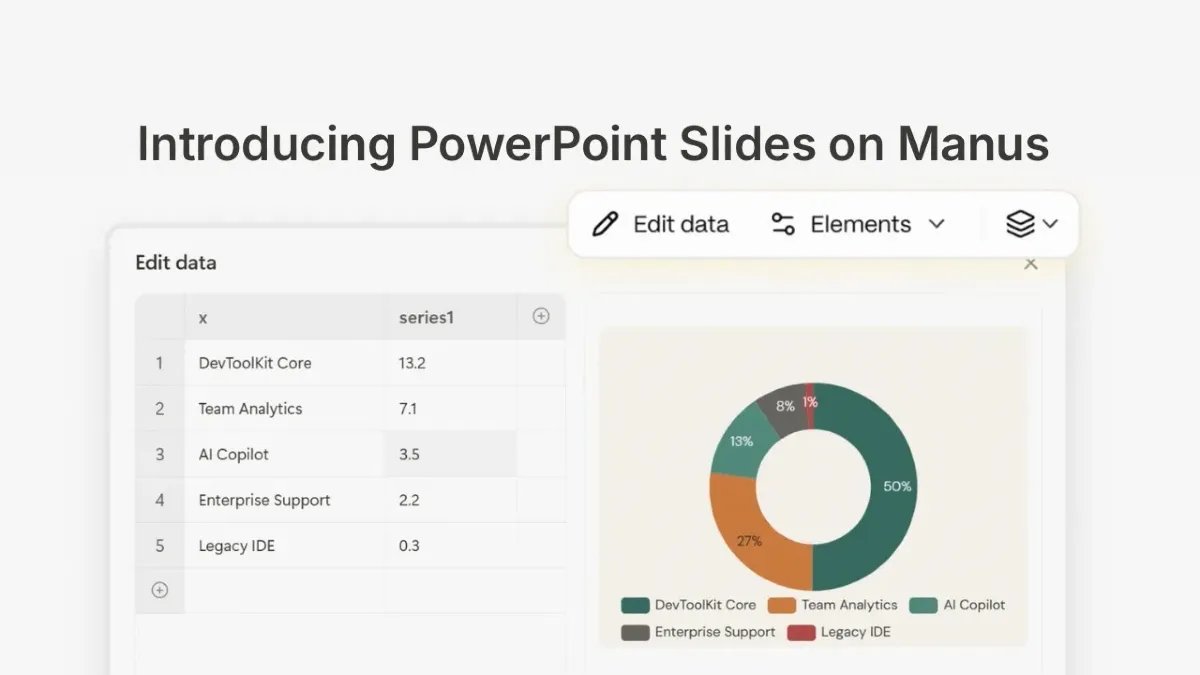
Because the charts are structurally real, you can edit them directly inside the Manus viewer before downloading. Click any chart and a toolbar appears with two controls: Elements and Edit Data.
Elements lets you toggle chart components on and off — axes, data labels, gridlines, legend — so you can customize appearance without rebuilding anything. Turn on data labels and every bar segment instantly displays its value. Turn off gridlines for a cleaner look. Each toggle updates the chart in real time.
Edit Data opens a spreadsheet overlay directly on top of your slide. The left side shows your data table — rows, columns, and the actual numbers behind the chart. The right side shows a live preview. Change a value in any cell and the chart redraws instantly: bars grow or shrink, labels update, proportions shift. Hit Confirm and the slide reflects the new data. No round-trip to Excel, no re-importing a CSV.
This is what native .pptx generation actually unlocks. The chart is not a flat image — it is a real object with real data behind it. Edit it in Manus, or download and edit it later in PowerPoint. Either way, the data stays live.
How to Use PowerPoint Mode
Open Manus and select the Slides tool. In the mode dropdown, choose PowerPoint — you will see it alongside Standard and Image modes. Describe your presentation topic, upload a document or data file, or connect Google Sheets for live data access. Manus outlines the deck, designs the slides, and generates the .pptx. Edit charts and tables directly in the viewer before downloading, or download immediately and continue in PowerPoint.
How the Three Slide Modes Compare
- Standard: Fast and versatile for general-purpose decks. Good all-rounder.
- Image: High-impact visual slides powered by GPT Image 2. Best for design-heavy presentations where visual punch matters more than data.
- PowerPoint: Native
.pptxoutput optimized for data-dense business presentations with editable charts and tables. Best when the file needs to live in PowerPoint or Google Slides after delivery.
Availability
PowerPoint mode is available today in Beta for users on the 1.6 and Max models on Manus.
For teams that regularly deliver data-heavy business presentations, this closes a gap that AI slide tools have had since the beginning. The best decks combine sharp analysis with reliable delivery — and until now, "reliable delivery" meant doing the final formatting yourself in PowerPoint. With native .pptx generation, that step may finally be optional.
Related Reading
- A Fake Photo of a Hospitalized Senator Just Proved Deepfake Detection Actually Works — on AI-generated visuals and what real-world verification looks like
- OpenAI Codex and ChatGPT Work Hit 7 Million Active Users — the broader AI productivity tools landscape hitting new milestones
- Claude for Teachers Is Here: Free AI for K-12 Educators — another AI tool launch expanding access across professional use cases