Why Gemini's Managed Agent Updates Land Differently Than Usual Feature Drops
Most AI platform updates follow a predictable arc: a new model, a higher context window, a benchmark claim. Google's latest Gemini API release doesn't fit that pattern. Instead, it addresses three specific pain points that developers kept surfacing in feedback about managed agents — cost unpredictability, manual scheduling overhead, and access friction. The result is a set of changes that quietly make the Gemini Interactions API more suitable for production deployments than it was even two weeks ago.
The three updates — free tier access, token budget guardrails, and cron-based scheduled triggers — are individually useful. Together, they start to look like a coherent infrastructure play. Here's what changed and why it matters for engineers building on top of agentic tooling.
What Managed Agents in the Gemini API Actually Do
Before unpacking the updates, it's worth being precise about what "managed agents" means here. When you call the Gemini Interactions API, you're not just invoking a model completion endpoint. You're handing a task to a cloud-hosted agent — currently the Antigravity agent — that autonomously handles reasoning, code execution, package installation, file management, and web lookups inside an isolated sandbox environment.
The practical upshot: you send a single request, and the agent runs a multi-step loop across tools and code without you maintaining any local infrastructure, orchestration logic, or runtime environment. Files created during one interaction persist in the sandbox. The agent can clone repositories, run audits, write reports, and execute arbitrary code — all server-side.
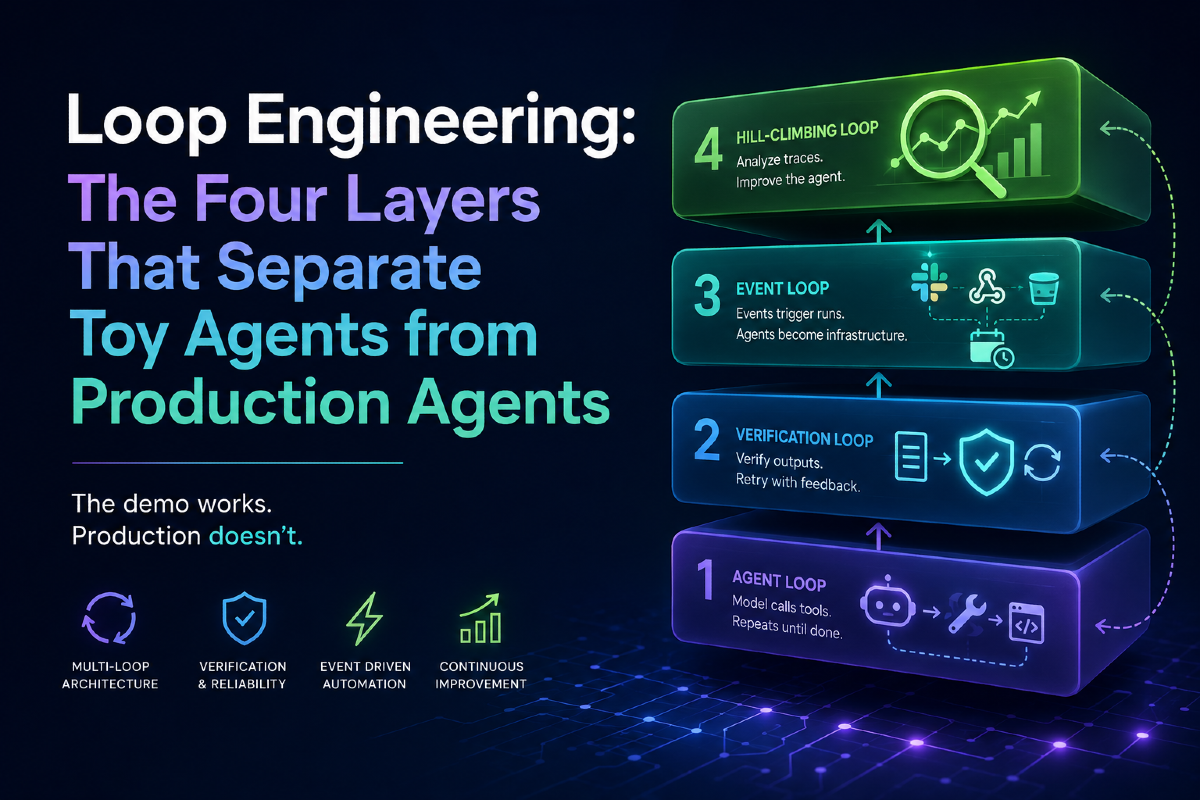
This is a meaningfully different model from vanilla LLM calls, and it's why the new budget and scheduling features are more significant than they'd be in a standard API context. When a single "interaction" can spawn dozens of tool calls and hundreds of thousands of tokens, the stakes around cost control and automation are much higher.
Free Tier Access: Lower Barrier, Same Capability
The most straightforward update is free tier availability. You can now use Gemini managed agents with an API key tied to a free project — meaning no active billing required. Interactions under the free tier are not charged and instead run under free rate limits and usage quotas.
This matters primarily for exploration and prototyping. Previously, testing autonomous multi-step agents required a billing-enabled project, which added friction for individual developers or small teams evaluating the platform. The change doesn't alter what the agent can do; it lowers the cost of finding out.
Practically, expect free tier rate limits to be meaningful constraints on throughput. For high-volume production workloads, a billing-enabled project remains the right path. But for a developer trying to understand how Antigravity handles a complex repository audit task, the free tier now makes that genuinely accessible.
Budget Controls: Solving the Runaway Token Problem
The more technically interesting addition is the max_total_tokens parameter inside agent_config. This caps the total tokens — input, output, and thinking — that a single interaction can consume. When the agent hits the limit, it stops cleanly and returns status: "incomplete" rather than silently running up an uncapped bill.
This directly addresses what engineers building agentic pipelines have started calling the tokenmaxxing problem — where autonomous agents or automated pipelines consume vastly more tokens than expected, blowing through budget before anyone notices. A hard cap with a graceful stop is a simple but important primitive for production reliability.
Critically, incomplete interactions don't lose their work. The agent's environment and filesystem state are preserved when a budget limit triggers, and you can resume exactly where it left off by passing previous_interaction_id and the environment ID alongside a fresh budget. This makes the budget control less of a kill switch and more of a checkpoint mechanism — useful for long-running tasks where you want cost-awareness without throwing away progress.
Here's what that looks like in TypeScript using the @google/genai SDK:
import { GoogleGenAI } from "@google/genai";

const client = new GoogleGenAI({});

// Start a repository audit capped at 10,000 tokens
const interaction = await client.interactions.create({
  agent: "antigravity-preview-05-2026",
  input: "Clone https://github.com/google/guava, audit all modules for deprecated classes, and generate a migration report at /workspace/migration_audit.md.",
  agent_config: {
    type: "antigravity",
    max_total_tokens: 10000,
  },
  environment: "remote",
});

console.log(`Status: ${interaction.status}`);
console.log(`Tokens used: ${interaction.usage?.total_tokens}`);

// Resume if the budget was hit before completion
if (interaction.status === "incomplete") {
  const continuation = await client.interactions.create({
    agent: "antigravity-preview-05-2026",
    input: "continue",
    previous_interaction_id: interaction.id,
    environment: interaction.environment_id,
    agent_config: {
      type: "antigravity",
      max_total_tokens: 10000,
    },
  });
  console.log(`Continuation status: ${continuation.status}`);
}
The interaction pattern here — cap, pause, resume — is the kind of primitive that enables safe deployment of autonomous agents in cost-sensitive environments. It's a meaningful step toward making AI agents that don't surprise you in production.
Scheduled Triggers: Agents as Recurring Infrastructure
The third update is arguably the most architectural shift. Triggers let you bind an agent, an environment, a prompt, and a cron schedule into a persistent resource that fires automatically — no external cron infrastructure, no dedicated scheduling scripts, no manual invocations.
A trigger is essentially a managed, recurring agent job. You define it once, and it runs on schedule. Each execution reuses the same underlying sandbox environment, which means files, clones, and reports from previous runs are immediately available to subsequent ones. This makes triggers well-suited to tasks like daily issue triage, nightly regression reporting, or scheduled maintenance across authenticated network allowlists.
The network allowlist feature is worth highlighting: you can configure the agent's sandbox to reach specific external domains with injected authentication headers, which means a scheduled agent can legitimately interact with GitHub APIs, internal tooling, or any authenticated service you allowlist.
import { GoogleGenAI } from "@google/genai";

const client = new GoogleGenAI({});

const trigger = await client.triggers.create({
  schedule: "0 9 * * *", // Every day at 9:00 AM
  time_zone: "America/Los_Angeles",
  display_name: "daily-issue-solver",
  interaction: {
    agent: "antigravity-preview-05-2026",
    input: [
      {
        type: "text",
        text: "Review open PRs for new comments and address feedback. Check for issues labeled 'accepted', skip any tracked in /workspace/solved-issues/, fix the rest, and open PRs. Save reports to /workspace/solved-issues/.",
      },
    ],
    environment: {
      type: "remote",
      network: {
        allowlist: [
          {
            domain: "api.github.com",
            transform: {
              Authorization: "Bearer ghp_example_token",
            },
          },
          { domain: "github.com" },
        ],
      },
    },
  },
});

console.log(`Trigger created: ${trigger.id}`);
console.log(`Next scheduled run: ${trigger.next_run_time}`);

// List past executions
const executions = await client.triggers.listExecutions(trigger.id);
for (const ex of executions.trigger_executions) {
  console.log(`${ex.id}: ${ex.status} (${ex.start_time} - ${ex.end_time})`);
}
Persistent file state across runs is the detail that makes this genuinely useful for maintenance tasks. The agent can skip issues it already fixed — because it wrote them to /workspace/solved-issues/ in a previous run — rather than rediscovering and re-attempting solved work. That kind of stateful continuity across runs is hard to replicate with stateless function calls and external state management.
How This Fits the Broader Agentic AI Landscape
Google's managed agents approach — isolating execution in a cloud sandbox, handling orchestration server-side, and exposing a single API surface — is a direct bet that developers don't want to manage agent infrastructure themselves. This release tightens that value proposition with cost controls and scheduling, features that move managed agents closer to "deploy once, runs reliably" rather than "prototype and hope."
The comparison point for developers evaluating agentic tooling is increasingly about operational properties rather than raw capabilities. Tools like Agnes-2.5-Flash compete on price and accessibility. What Google is doing with triggers and budget controls is competing on production-readiness — a different axis.
For teams already building on Gemini, the practical recommendation is straightforward: add max_total_tokens to every agent_config you're running in production. The cost of not having a budget cap is much higher than the minor orchestration overhead of handling an incomplete status. And for recurring automation tasks — nightly jobs, daily standups on open issues, scheduled repo maintenance — triggers now offer a native alternative to duct-taping agent invocations onto external cron systems.
Getting Started
All three features are available now through the Gemini API. To get started:
- Install the SDK:
npm install @google/genai - Free tier: use any API key linked to a project without billing enabled
- Budget controls: pass
max_total_tokensinsideagent_configon anyinteractions.create()call - Triggers: use
client.triggers.create()with a standard cron expression and your interaction config
Full documentation is available in the Google AI documentation, including the Antigravity agent overview and managed agents quickstart covering custom agent definitions, environment configurations, network rules, and streaming patterns.
Related Reading
- The "Tokenmaxxing" Crisis: How Enterprises Are Burning AI Budgets — and How Anthropic Is Trying to Stop It
- 43% of AI Code Breaks in Production — and Engineers Are Paying the Price
- Agnes-2.5-Flash Is Free, Unlimited, and Coming for Your Coding Stack
- GPT-Red Breaks Every Model It Faces — Then Makes the Next One Unbreakable