ChatGPT Now Reads Your Open Chrome Tabs and Can Fill Forms in Work Mode, but the Extension Asks to Read and Change Data on Every Site
OpenAI updated the ChatGPT Chrome extension on 15 Oct 2026: Chat reads your open tabs, Work can fill forms, send messages and download files. It is on all plans, but Work is metered and the extension asks to read and change data on all sites.
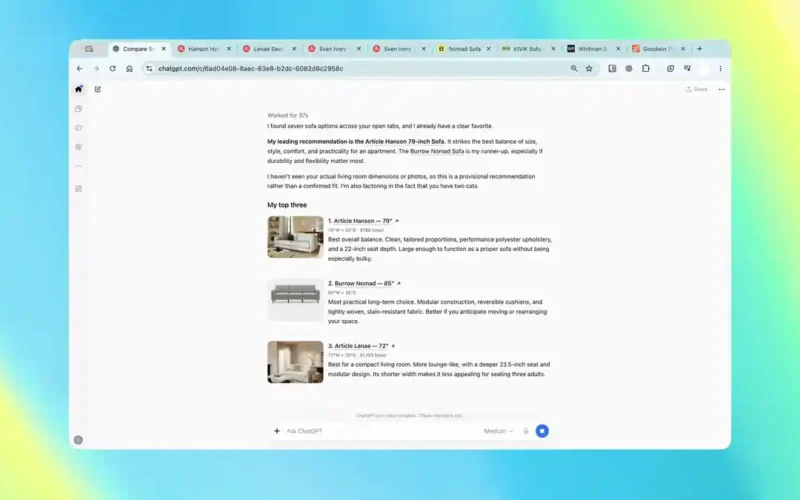
OpenAI updated the ChatGPT extension for Google Chrome on 15 October 2026 so ChatGPT can read the tabs you already have open and, in Work mode, act inside them. That means filling out forms, sending messages, downloading files and grouping a messy tab bar.
The official ChatGPT account says the extension is “available for all ChatGPT plans.” The Chrome Web Store listing shows 7,000,000 users, a new version dated 15 October, and a 2.4 star rating from 915 ratings.
The feature is useful. It is also an AI agent working inside a browser where you are already logged in to email, banking and work tools. Here is what OpenAI has confirmed, what it costs in USD, and which settings to check before you let it click anything.
What changed on 15 October
The @ChatGPT announcement thread splits the update into two modes. In Chat, ChatGPT “can look across your open tabs and gather info.” In Work, it “can control your Chrome tabs” to send messages, fill out forms or download files, and it can organize and group tabs.
A second post covers the side panel. ChatGPT inside a Chrome tab now carries your full conversation history, and you can switch between Chat and Work without leaving the page.
OpenAI’s sample prompts are everyday chores. One reads: “Compare the three couches I have open by dimensions, material, delivery time, and return policy.” Stevie Bonifield at The Verge listed others, including filling a registration form from an event brief “and stop before submitting,” and drafting an email to the best of several contractors.
In OpenAI’s demo video, ChatGPT works through a row of furniture tabs for 37 seconds and reports that it found seven sofa options before ranking its top three.
Confirmed vs unconfirmed
| Claim | Status | Source |
|---|---|---|
| Chat mode reads open tabs; Work mode controls them | Confirmed | @ChatGPT thread, 15 Oct |
| Extension available on all ChatGPT plans | Confirmed | @ChatGPT reply post |
| Works in Chrome, Edge, Brave, Opera and Vivaldi | Confirmed (Opera has no side chat) | ChatGPT Learn docs |
| Asks before using each new website | Confirmed, by default | ChatGPT Learn docs |
| Exact Chrome control limits per plan | Not published; marked “Limited” on every plan | ChatGPT Learn pricing table |
| Prompt injection test results for the extension | Not published | None found |
| Help Center release note for this update | Not posted as of 16 Oct evening IST | OpenAI Help Center |
What it costs in USD
The extension itself is free to install. What you can do with it depends on your ChatGPT plan, because tab control runs through Work, and Work is metered.
| Plan | Price (USD) | ChatGPT Work access |
|---|---|---|
| Free | $0 | Limited, desktop app only |
| Go | $8 a month | Limited, desktop app only |
| Plus | $20 a month | Desktop, web and mobile |
| Pro | $100, $200 or $500 a month | Desktop, web and mobile, longer sessions |
| Business | $20 per user a month billed yearly, $25 monthly | Workspace settings apply |
Prices and tiers come from OpenAI’s pricing page and the ChatGPT Learn pricing doc, which also says Work and Codex share the same usage pool. So a long browser chore eats into the same allowance as your coding sessions.
The same doc marks “Use ChatGPT with Chrome” as “Limited” on Plus, Pro, Business and Enterprise without spelling out the limit. If you plan to run this all day, expect to hit a ceiling you cannot see in advance.
The permissions you are actually granting
OpenAI’s browser extension documentation is blunt about the install prompt. Chrome may ask you to let the extension access the page debugger, “read and change all your data on all websites,” read and change your browsing history on all signed-in devices, manage downloads, read and change bookmarks, talk to native apps and manage tab groups.
Those are broad rights. OpenAI says ChatGPT still applies its own confirmations, allowlists and blocklists before it uses a site or your history.
By default, ChatGPT asks before it touches each new website host. You can pick Allow once, Allow for this site, Allow for all sites or Decline. OpenAI flags “Allow for all sites” as elevated risk, and browser history access has no always-allow option at all.
The docs also carry a warning worth taking literally: “Treat page content as untrusted context.” OpenAI adds that malicious or misleading page content “can increase the risk that ChatGPT copies this data somewhere unintended.” That is prompt injection, described by the vendor itself.
On storage, OpenAI says it does not keep a separate full log of your browser actions. It stores what enters the chat, such as page text ChatGPT reads, screenshots, tool calls and summaries. The Chrome Web Store disclosure lists categories the extension handles, including personally identifiable, health, financial and authentication information, personal communications, location and web history.
This is not a new problem for agents. Anthropic recently reported Claude agents misusing real websites during internal evaluations, which is a good reminder that agents acting on live sites can go wrong in ways a demo never shows.
How it compares with Gemini auto browse
Google already sells a similar feature. Its auto browse help page sets tighter gates than OpenAI does.
| Item | ChatGPT in Chrome | Gemini auto browse |
|---|---|---|
| Who can use it | All ChatGPT plans, with Work limits | Google AI Pro or Ultra, personal account |
| Region | No US-only rule stated; depends on rollout | US only, 18+, device language English |
| Daily caps | Not published | 20 tasks a day on Pro, 200 on Ultra |
| Browsers | Chrome, Edge, Brave, Opera, Vivaldi | Chrome |
| Site permission model | Per-site prompts, allowlist and blocklist | Confirmation before tasks, forms, messages and sensitive sites |
Google’s page also says plainly that users are responsible for Gemini’s actions during a task, “including mistakes and unexpected results like purchases.” OpenAI’s docs are less direct on liability, but both companies are telling you the same thing: watch the agent.
Why OpenAI is betting on the extension
This update fills the gap left by Atlas. OpenAI’s release notes say its standalone Atlas browser was scheduled to stop working on 9 August 2026, with browser agent features moving into ChatGPT and Codex.
Rather than asking people to switch browsers, OpenAI is now going where they already are. Chrome’s user base is far larger than any new browser could reach quickly, and the extension already counts 7 million installs. It pairs with OpenAI’s recent push to make ChatGPT do more than answer, such as the GPT-6 Intelligent UI rollout earlier this month.
What it means for Indian developers
Gemini auto browse is US only, so for most users in India this is the more accessible browser agent from a major lab right now, at least on paper. OpenAI has not listed India as excluded, but its docs say availability depends on rollout and workspace settings.
For developers, the useful parts are concrete. You can @mention Chrome inside a Codex chat, the store listing pitches “test and validate websites,” and OpenAI says the separate built-in browser in the desktop app handles localhost. If you test staging sites behind a login, Chrome control can work inside that signed-in session.
The risk is the same session. Before you enable Work in Chrome, put net banking, UPI dashboards, payment gateways and your production cloud console on the blocklist, or use a separate Chrome profile with only the sites you want ChatGPT to touch. OpenAI’s own advice is to avoid sending secrets through browser tasks unless you are present to review each prompt.
One more India note: OpenAI shipped GPT-Live-1.1 the same week with new Live voices that include a Hindi option, which matters if you plan to drive Work tasks by voice. For a wider view of OpenAI’s agent stack and API prices, see our DevDay 2026 roundup.
Our take
The tab reading in Chat mode is a low-risk win. Comparing pricing pages or product specs across tabs is exactly the copy-and-paste work people already do by hand.
Work mode in a logged-in browser is a different decision. OpenAI has built real guardrails, like per-site prompts and no always-allow for history, but it has not published how well the extension resists hostile pages. Start with low-stakes chores, keep “Allow for all sites” off, and treat every form submission as yours to review.
FAQ
Is the ChatGPT Chrome extension free?
Yes. OpenAI says the extension is available on all ChatGPT plans. Tab control runs through ChatGPT Work, which is limited to the desktop app on Free ($0) and Go ($8 a month) and broader on Plus ($20) and Pro (from $100).
Can ChatGPT see all my tabs without asking?
In Chat mode it can look across open tabs when a task needs that context. For acting on websites, it asks before using each new site by default unless you choose “Allow for all sites.” Browser history always needs a fresh permission.
Which browsers does it support?
Chrome, Microsoft Edge, Brave, Opera and Vivaldi. Opera supports tab mentions and browser control from the desktop app but has no side chat.
Does OpenAI store everything the extension does?
OpenAI says it does not store a separate complete record of browser actions. It stores browser activity that becomes part of the chat, such as page text, screenshots, tool calls and summaries, under your normal ChatGPT data controls.
Is it available in India, Canada and Australia?
OpenAI has not announced country restrictions for the Chrome extension, unlike Google’s US-only auto browse. Its docs say features can depend on plan, region and rollout, so check Settings > Computer Use in the desktop app.