Mesh LLM: Run Any Model Across Multiple Machines With One OpenAI-Compatible API
Mesh LLM pools GPUs across machines into a single OpenAI-compatible API. Learn how this distributed runtime handles large models via mesh routing and Skippy splits.
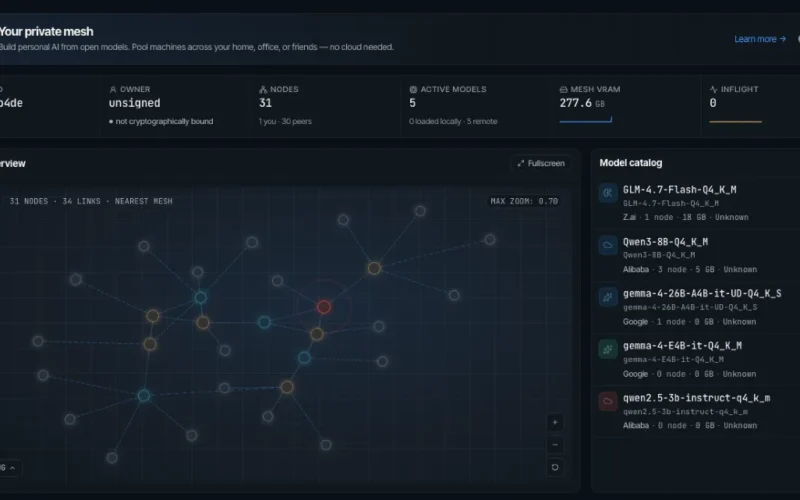
Running large language models locally is increasingly constrained by hardware limits. However, Mesh LLM: Run Any Model Across Multiple Machines With One OpenAI-Compatible API solves this issue effectively. This open-source project pools GPUs and memory across multiple devices instead of optimizing for one box.
Therefore, you can run models too large for a single consumer GPU. The system exposes the entire cluster as a unified endpoint at http://localhost:9337/v1. You can start with one node today and add more later. The mesh automatically decides whether to route requests locally or split them across machines.
What Is Mesh LLM?
Mesh LLM is a distributed inference runtime specifically for GGUF-format models. It wraps complex cross-machine serving behind a familiar API surface. Consequently, any tool supporting OpenAI’s /v1/chat/completions format works immediately. This includes popular agents like Goose, OpenCode, and Claude Code.
The system relies on three core concepts to function smoothly:
- Mesh routing: Every node exposes the same API. Requests route to whichever peer can serve that specific model.
- Skippy stage splits: Large models break into contiguous layer ranges across nodes. Only necessary layers are fetched per device.
- Public and private meshes: Join public meshes via Nostr discovery or create private ones with invite tokens.
Quick Start Guide
Installation requires just a single command on Linux or macOS. First, run the install script from the official repository. Windows users can achieve the same result via PowerShell.
After installation, run the setup wizard using mesh-llm setup. Then, join the public mesh and start serving with mesh-llm serve --auto. This command picks a backend and downloads a suitable model if needed.
It also starts the local API on port 9337 and opens the web console on port 3131. For headless servers, simply add the --headless flag. Finally, verify your setup by listing available models or sending a test chat completion request via curl.
Workflow Cheat Sheet
Mesh LLM supports various deployment patterns through simple CLI flags. Use mesh-llm serve --auto to try the public mesh instantly. Alternatively, start a private mesh by specifying a model name directly.
You can also publish your own mesh or join an existing one via invite token. For API-only access without serving, use the client command. Additionally, splitting large models across nodes is possible with the --split flag and a Hugging Face repository path.
Skippy Stage Splits for Large Models
The most technically interesting feature is the Skippy runtime. When a full GGUF file exceeds single-node capacity, Skippy splits it into stages. Each package contains configuration files plus GGUF fragments.
Thus, peers only fetch the specific slices needed for their assigned stage. The coordinator plans these contiguous layer ranges carefully. It starts downstream stages first to ensure proper data flow before publishing the primary route.
This process remains transparent to the calling node regardless of machine count. Split multimodal serving is currently certified for several major vision and OCR models using real fixtures.
Mixture-of-Agents Gateway
An experimental Mixture-of-Agents (MoA) gateway activates when setting the model field to “mesh”. Instead of routing to one model, the proxy fans prompts out to every available model in parallel.
Deterministic logic then arbitrates responses to return a single compatible reply. The arbiter runs in code rather than as another model call. However, it escalates to a reducer LLM only during genuine conflicts. Note that this feature requires at least two distinct models in the mesh.
Model Family and Platform Support
The Skippy runtime tracks llama.cpp parity across many reviewed GGUF models. Currently, it covers 72 P0/P1 family rows with 89 certified rows total. Supported families include Qwen, Llama, Gemma, Mistral, DeepSeek, and many others.
Tagged releases ship prebuilt bundles for macOS, Linux, and Windows. These cover CPU, CUDA, ROCm, Vulkan, and Metal targets. Building from source requires Rust, Node.js, CMake, and the just task runner.
Additionally, packaged executables include release attestation for security verification. You can inspect binaries to confirm they are valid, missing stamps, or invalid due to modification.
Agent Integrations and Comparisons
First-class CLI wrappers exist for popular agentic tools. Commands like mesh-llm claude or mesh-llm goose wire agents to your mesh endpoint instantly. This pairs naturally with the workflows in our 6-month Agentic AI Engineer roadmap.
Most local setups optimize heavily for single-machine efficiency. However, Mesh LLM complements those approaches by aggregating spare GPU capacity. If you build production agents, reliable infrastructure matters enormously.
A scalable local endpoint removes significant bottlenecks from the agent loop. This aligns with concepts explored in Loop Engineering: The Four Layers That Separate Toy Agents from Production Agents.
Getting Started Resources
Please remember that Mesh LLM is experimental distributed-systems software. Bug reports should include platform details, backend flavor, and status output. The project is fully open-source on GitHub.
Full documentation resides in the repository’s docs folder. Key starting points include guides on meshes, Skippy splits, and CLI usage. If you need a clean way to pool local GPU resources, this tool deserves a close look.
